
Guidelines
The learner's journey
Use this step-by-step guide to move from exploring your options to applying for the grant. Each step helps you get closer to training that can support your next career move.
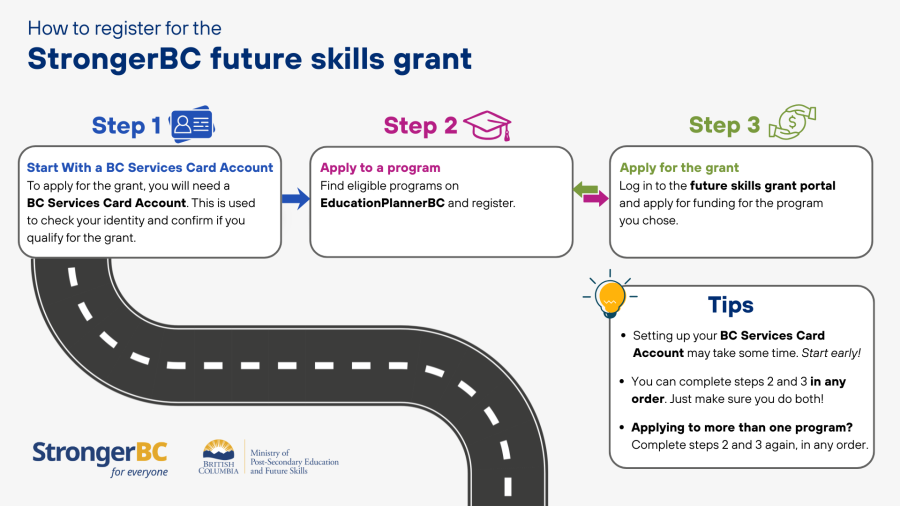
Explore your options
Start by thinking about what you want to do next. You may want to grow in your current job, move into a new field or bring your experience into B.C.’s workforce. The StrongerBC future skills grant can help you build the skills to take that next step.
Not sure where to begin? These WorkBC tools can help you explore your options:
You can also connect with WorkBC Employment Services for one-on-one support.
Explore your career options here.
Check if you qualify
Check the eligibility criteria to see if this grant could help you.
The grant is available to eligible B.C. residents, regardless of your income. You may get up to $3,500 for eligible short-term training at a public post-secondary school in B.C.
View the checklist to determine learner eligibility criteria.
Contact information
BC Services Card account help
Contact the Service BC Help Desk if you have questions about:
- Setting up the BC Services Card app
- Creating your username and password
- Using a BC Token
- Logging in to a website
Program search or application help
Contact EducationPlannerBC (EPBC) if you have questions about:
- Finding eligible training
- Applying to a program
- Using the EducationPlannerBC website
Program registration, tuition or receipt questions
Contact your school if you have questions about:
- Registration and seat availability
- Program costs or tuition
- Dropping or withdrawing
- Tax documents or receipts
Future Skills Grant funding or eligibility questions
Contact the Future Skills Grant Team if you have questions about:
- Eligibility
- Funding periods
- Portal issues
- Who to contact